How to Read a Binary Clock in BCD and Pure Binary
Learn to read a binary clock by adding lit-dot values. Compare BCD and whole-component binary displays with a worked 10:37:49 example.
- Binary-Coded Decimal
- Binary Place Values
On this page
Two different ways to represent binary values exist: binary-coded decimal (BCD), where each digit is encoded separately, and pure binary, which encodes the value as a whole. Both use powers of two as their base, with the latter method using additional positions to encode numbers that would require more bits otherwise.
The main difference between the two approaches lies in the grouping: one encodes decimal digits and the other encodes the time components themselves. For example, you can’t determine from just looking at the position orientation alone whether the clock displays times in groups of six LED columns, representing each of the digits (from 0 to 9) individually; alternatively, it may be arranged in three rows, where the entire hour, minute, or second is displayed in its entirety, represented by one group. In some clocks, each column represents an LED for either hours, minutes, or seconds, but the individual LEDs are lit in order to represent the time.
Add the Weights of Illuminated Positions
In any case, you need to understand how illuminated positions become numbers, then how those translate into actual times. Reading direction varies depending on how the clock is documented. A vertical BCD layout documents the weights of the positions in order from bottom to top, from 1 through 8. That’s a bit counterintuitive, since the weight increases going upward, and the same applies to horizontal layouts: The weight is determined by the label, if one exists, or by the position of the segment.
A simple rule holds for the illumination of the segments: Add together the weights of the illuminated positions. The result becomes the number associated with that segment, such as hours, minutes, or seconds.
Reading Six BCD Digits
Let’s begin by walking through a worked example: 10:37:49.
First, we need to look at the six separate BCD digits and figure out what they mean. Each column represents a single digit, and if none of the lights in that column are lit, it still contributes a value to the time. We’ll take the example of a clock displaying 10:37:49. This time requires us to find the correct numbers within each of the six LED columns. Let’s work through this:
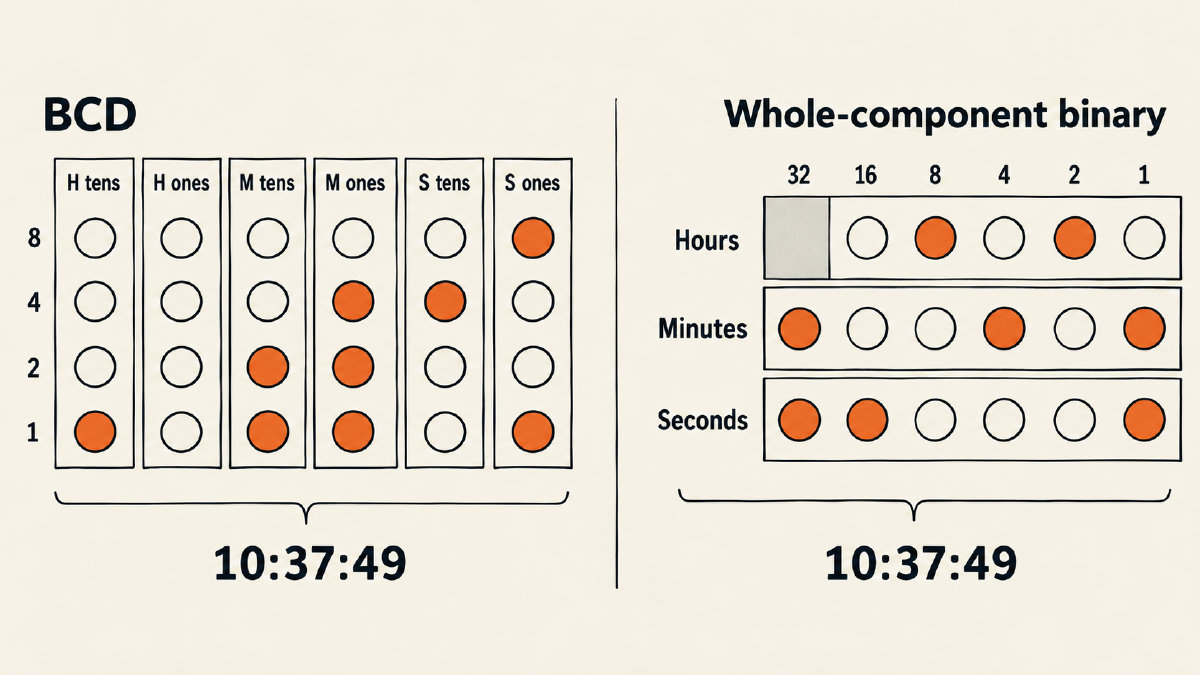
In our example, the first column on the left contains one light that is illuminated: the “1” position. This is our tens of the hour (1). Moving to the next column, all the lights remain unlit. Since we’re using a BCD clock, these unlit lights contribute nothing, and thus the hour remains at 10 rather than simply being interpreted as 1.
Next comes the minutes. The tens of the minutes has the “1” and the “2” light turned on. Adding these values together gives 3, which tells us the minutes are now at 30. Finally, the ones of the minute are lit up, and they add up to 1 + 2 + 4 = 7. Therefore, the minutes are at 37.
We move down to the seconds display. In the tens of the seconds, the “4” light is illuminated, giving us a value of 4. In the ones of the seconds, the “8” and the “1” lights are illuminated. These add up to 9, making the seconds equal to 49. Putting everything together, we have a time of 10:37:49.
Reading a Pure Binary Clock
As we saw earlier, reading the time in a pure binary format involves adding up the weights assigned to each segment within each component. As you might expect, this process is very similar to that used in a BCD layout. Take the example of a watch with 12-hour markings, but instead of having only 12 segments, there are several segments representing the hour, minute, and second values.
Let’s walk through how to interpret 10:37:49 using a pure binary clock layout. First, let’s look at the hour display. Within the hours section, both the “8” and the “2” lights are turned on, adding up to a total of 10. Therefore, the hour display reads 10.
Within the minutes, the “32” and “4” lights are illuminated. Together, they form a total of 36. Then, the “1” light is also turned on, increasing the minute count to 37. Finally, the seconds display consists of both the “32” and “16” lights being illuminated, totaling 48. The final “1” light turns the seconds count up to 49. Thus, the total time displayed is 10:37:49.
When working with pure binary, the layout of the clock is usually dictated by the designer. Most common examples feature a clock with five positions dedicated to the hour (with weights of 1, 2, 4, 8, and 16) and six positions for both the minutes and seconds (with weights of 1, 2, 4, 8, 16, and 32). Some examples include extra segments that allow for a more detailed breakdown of the time.
Sources
Try it yourself
Free, in your browser. Nothing you type is uploaded.