What Is the Binary System? How 0s and 1s Store Text in a Computer
The binary system is base-2, using only 0 and 1. See how bits, bytes and place values work and how computers store letters as binary with ASCII and UTF-8.
- Bits and Bytes
- ASCII
- UTF-8
- History of Binary
On this page
The binary system is a base-2 numeral system that represents numeric values using only two symbols: 0 and 1. The word "binary" comes from the Latin term for "two," and it refers to the fact that the binary system uses only two digits, as opposed to the decimal (base-10) system that we normally use.
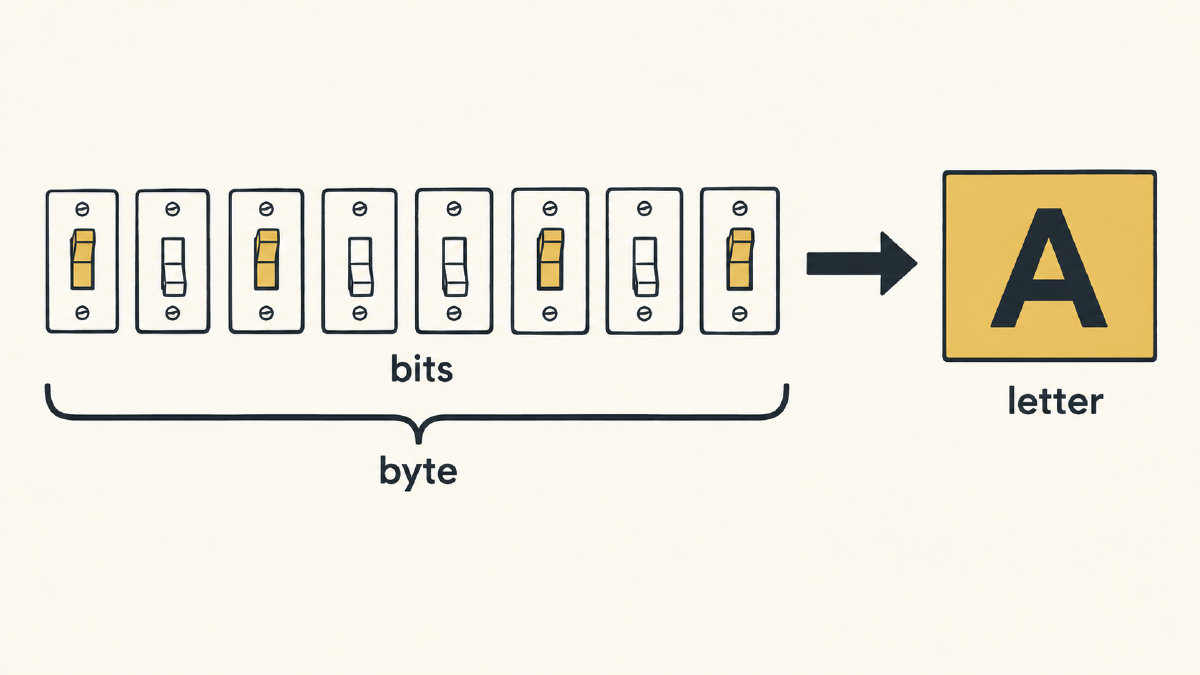
A single binary digit is called a bit, short for “binary digit.” A group of eight bits is referred to as a byte. As a result, the number of possible combinations within each byte is equal to the number of possible patterns you can form with eight bits — 256, or 2^8.
How binary place values work
Binary numbers work differently than our base-10 decimal numerals. Each position in a number represents a different place value, and the place values increase by powers of 2, instead of powers of 10. For example, the first digit on the right represents ones, then twos, fours, eights, etc. When adding up these place values, if they contain a 1, they’re added; if they contain a 0, they aren’t. If the total is 13, for example, its binary representation would be 1101, because 18 + 14 + 02 + 11 = 8+4+0+1 = 13.
The binary system doesn’t represent any real-world quantities, such as weight or length, but computers have made binary extremely useful, since the system works well with electronic switches that have two states: on or off. Typically, 0 stands for off and 1 for on, though which state counts as 1 depends on the architecture in use. This makes the system extremely useful, as all other numbers and characters are derived through combinations of the binary digits 0 and 1.
While this article has given a quick overview of what the binary system is, and how it functions, there’s more you can learn about the topic.
Why do computers use binary?
Computers store and process information in terms of binary numbers. Why not just use the decimal system we use in everyday life? It’s easier to store and transmit data using two states (on or off), rather than ten. Instead of designing a computer to handle 10 distinct voltage levels (or other signals), you simply need to design one that can switch between two voltage levels. A transistor either passes current or blocks it, matching 1s and 0s. Binary is also easy to implement with logic gates, which is why almost all modern computers use it, and it resists noise: in 5 V TTL logic, inputs from 2.0 V to 5 V count as 1, and inputs below 0.8 V count as 0. Decimal hardware would need more levels and more complex circuits, raising the risk of errors.
This is why binary was developed in the first place, back in the 17th century. At the time, though, Leibniz tied his binary work to arithmetic, the I Ching and his theology, not to building machines.
Of course, the modern world isn’t built upon transistors alone. These days, you’ll also see magnetic storage drives that use binary, as well. A disk drive reads and writes information using tiny magnetic particles stored in a pattern of magnetization that resembles a sequence of 1s and 0s.
How can binary be used to encode text?
We know that binary encodes numerical values. But how does it encode letters? There’s no direct connection between the letter A and the binary number 11000001, unless you’re told otherwise. However, there’s an established mapping between ASCII characters and binary codes.
ASCII, which stands for American Standard Code for Information Interchange, is a character encoding standard that maps printable characters and control codes to binary sequences of 1s and 0s. UTF-8 is a variable-width Unicode encoding system that uses 1–4 bytes to encode code points, and it keeps ASCII's single-byte values unchanged.
When encoding text using ASCII, the binary value of a character is stored inside a byte, usually using 7 bits. That gives a maximum of 128 possible characters, although some of those are control characters that don’t represent a printable symbol. All other ASCII characters are mapped to unique combinations of bits. The letter A, for example, corresponds to the ASCII code point 65, which equals the binary value 01000001. Since computers store bytes, not letters, the 7-bit code sits in an 8-bit byte with the top bit set to 0 — hence the leading 0.
UTF-8 extends ASCII by setting the highest-order bit to 1 when encoding certain Unicode characters, allowing UTF-8 to represent more than 128 characters.
A simple example of ASCII
The letter A, for example, is represented in binary as 01000001. This sequence of bits, known as a byte, is then passed onto another device, where the receiving device will translate the sequence back into its original format — in this case, the letter A.
How did binary come to be?
In the past, ancient Egyptians, Chinese, and Europeans used tally marks to keep track of numbers. Other civilizations, like the Indian civilization, even created positional notation, which allowed users to write numbers using powers of 10. It wasn’t until 1605 that Francis Bacon proposed a system that could map individual letters to a sequence of 0s and 1s.
Gottfried Leibniz, however, is most responsible for establishing the binary numeral system as it exists today. Around 1703, he published his “Explication de l’Arithmétique Binaire,” describing the binary system that he had discovered. He used the concept of zero and one as representations of truth and falsehood, much like Boolean algebra.
It wasn’t until 1937 that Claude Shannon published a paper titled “A Symbolic Analysis of Relay and Switching Circuits” that brought attention to the idea of using binary to create logic circuits and perform switching operations. In it, he described how the ideas of George Boole could be applied to the behavior of relays. This led to the development of digital electronics, and eventually, to computers.
Sources
Try it yourself
Free, in your browser. Nothing you type is uploaded.