How to Encode and Check a Binary Code Tattoo
Encode a binary code tattoo message, preserve its exact text and byte order, and check the final stencil against your saved binary.
- ASCII
- UTF-8
- Text to Binary
- Binary Verification
On this page
In this article, I will describe how to encode a message into binary code (for the purposes of tattooing) as well as methods for checking that the encoding was correct. The information is presented in order of importance, with recommendations.
The exact message
Preserve the exact text as provided: the capitalization, spaces, punctuation and the character sequence in accented text (e.g., é or ü). This is saved as the original text, and it contains both ASCII uppercase and lowercase letters as well as ASCII punctuation such as the comma (,), question mark (?) and period (.).
ASCII is not case-insensitive. While ASCII defines both lowercase and uppercase characters (in addition to symbols), many applications do not distinguish between them, but others do. Before conversion, check that the capitalization still matches your saved original text.
You must also consider whether your encoded text uses Unicode’s canonically equivalent text. That means that two strings may look the same but contain different character sequences representing equivalent text (such as combining characters versus precomposed characters). When converting these forms to binary, the result will vary accordingly.
Finally, you can choose a normalization method that ensures consistency within the text, preserving the intended meaning while ensuring a consistent choice of equivalent Unicode forms. The difference is that this approach doesn’t necessarily produce the same binary output.
ASCII vs. UTF-8
As previously discussed, ASCII’s definition includes the 7-bit ASCII character set, plus the byte representation which is simply eight bits (128 possibilities), where one bit is always zero (i.e., 0 followed by seven bits). ASCII-only text is identical to UTF-8 text. However, there are some characters that exist outside of ASCII, specifically diacritical marks, which require a separate code point in UTF-8.
For the purposes of this discussion, I’ve chosen to use UTF-8.
Browser-based encoding
Using my browser, I can access the site’s text-to-binary tool. It offers seven-bit and eight-bit output with several separator options; select eight-bit output and spaces between groups before converting. If we take the example from the previous section, the text would be:
Code → 01000011 01101111 01100100 01100101
This results in four byte groups (each consisting of eight bits). Multiplying that number (4) by 8 gives us 32 binary digits.
Note: I counted the digits from the actual output instead of what appears on screen. The site adds spaces between each group of eight bits, so those spaces should be ignored when counting. There are other examples online showing how many bytes are used to encode specific texts; however, the visible character count does not always equal the number of bytes. Instead, you need to calculate how many bytes were created from the original text.
Choosing a layout
When designing the final product, you’ll want to preserve the byte boundaries while creating an unambiguous reading sequence. Here are my editorial recommendations:
A linear arrangement (like rows of numbers)
A heart shape or infinity loop (with the beginning/ending marked clearly)
Each eight-bit group intact (without splitting up the groups)
Either a documented starting point and direction or a visual marker
Separate plain-text binary master in original sequence (so you can later reference how to split the text into individual characters if needed)
Displayed group separators versus encoded SP (space)
Visual row breaks versus an original newline
Displayed spaces separate byte groups; a space between words in your message is itself encoded, even though it has no printed glyph. Visual row breaks are layout unless your original message contains a newline.
All recommendations derive from the encoding process, not the physical design of the tattoo itself.
Double-checking the code
There are two ways to check that the encoding has been done correctly:
First, decode the saved output (from the above step) back to text, comparing it to the frozen message. This will ensure that the decoded message matches the original.
Second, transcribe and check the stencil before approval. You’ll need to make sure that the decoded output exactly matches the original message. In this second step, we independently transcribe the binary text onto paper, then compare it with the original. It’s important to compare every eight-bit group against the master copy and retain any leading zeros that might have occurred during encoding.
Unicode offers additional considerations: you can save the binary file alongside the original text. Both versions can be compared visually, although matching appearance does not establish byte identity. If the original message contained special characters (e.g., accents), you should compare both versions. For the stencil check, transcribe in the agreed reading order, then use the site’s browser translator to decode that transcription. Compare capitalization, spaces and punctuation, and check the binary groups against the saved master even when Unicode text looks identical.
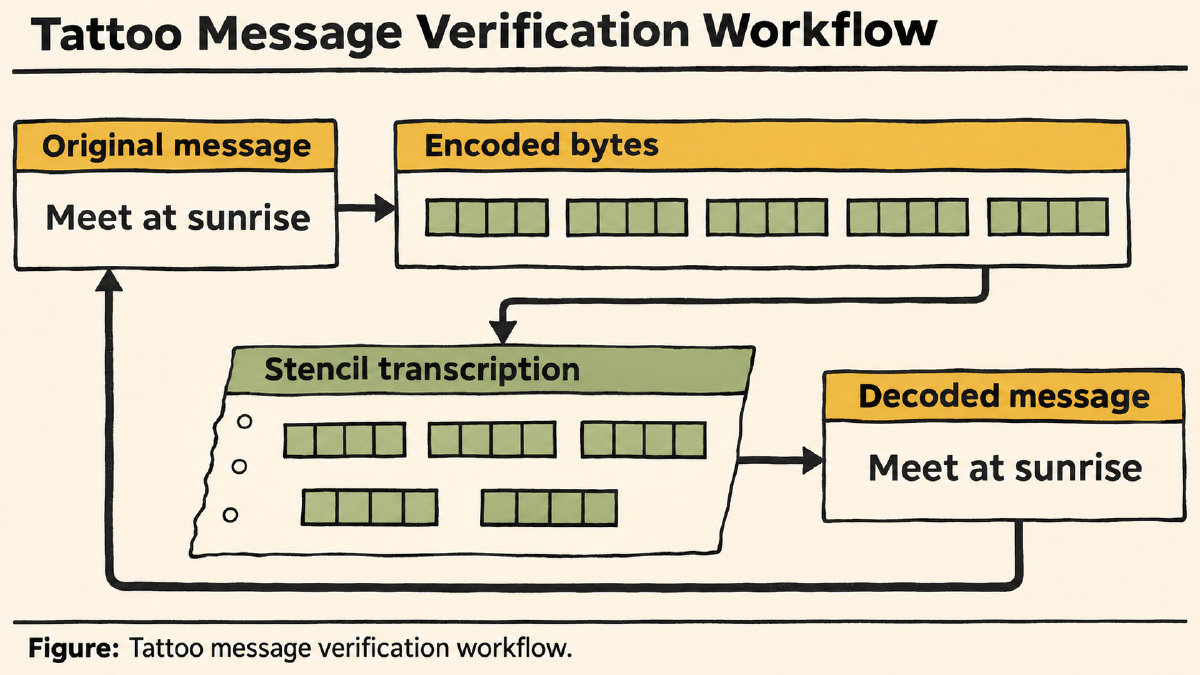
If the output looks the same as the original text, it may be acceptable, but there’s no guarantee that the stencil was correct, nor that the finished tattoo was executed properly. These are things that should be left for you to discuss with your tattoo artist.
Verification vs. design
It is important to note that text verification and transcription verification differ greatly from the design decisions that follow them. Encoding supplies no universal tattoo sizing or spacing measurements, and there’s no specified physical recording method or error-control technique. Your artist will be able to discuss the digit size, spacing and placement with you.
Sources
Try it yourself
Free, in your browser. Nothing you type is uploaded.
More in ASCII & Text Encoding
- How to Find the LSB Bit in an ASCII ByteFind the LSB bit in an ASCII byte, see how changing it turns A into @, and distinguish bit significance from numbering and byte order.
- What Is the Character Code for Degree Symbol °?The character code for degree symbol ° is U+00B0. See its UTF-8 binary bytes, HTML references and the documented Word shortcut.
- Who Invented Binary Code? Leibniz and the Road to ASCIILearn who invented binary code, what Leibniz contributed to binary arithmetic, and why ASCII text encoding has a separate history.