Bits and Bytes Explained Through ASCII and UTF-8 Text
Understand bits and bytes with ASCII and UTF-8 examples: eight bits per byte, 256 patterns, and why letters and emoji use different byte counts.
- Bits and Bytes
- ASCII
- UTF-8
On this page
It’s easy to mix up bits, bytes, and characters in our digital world. This article will explain the distinction between these concepts as well as how they fit into the overall picture of text encoding.
Bits and bytes
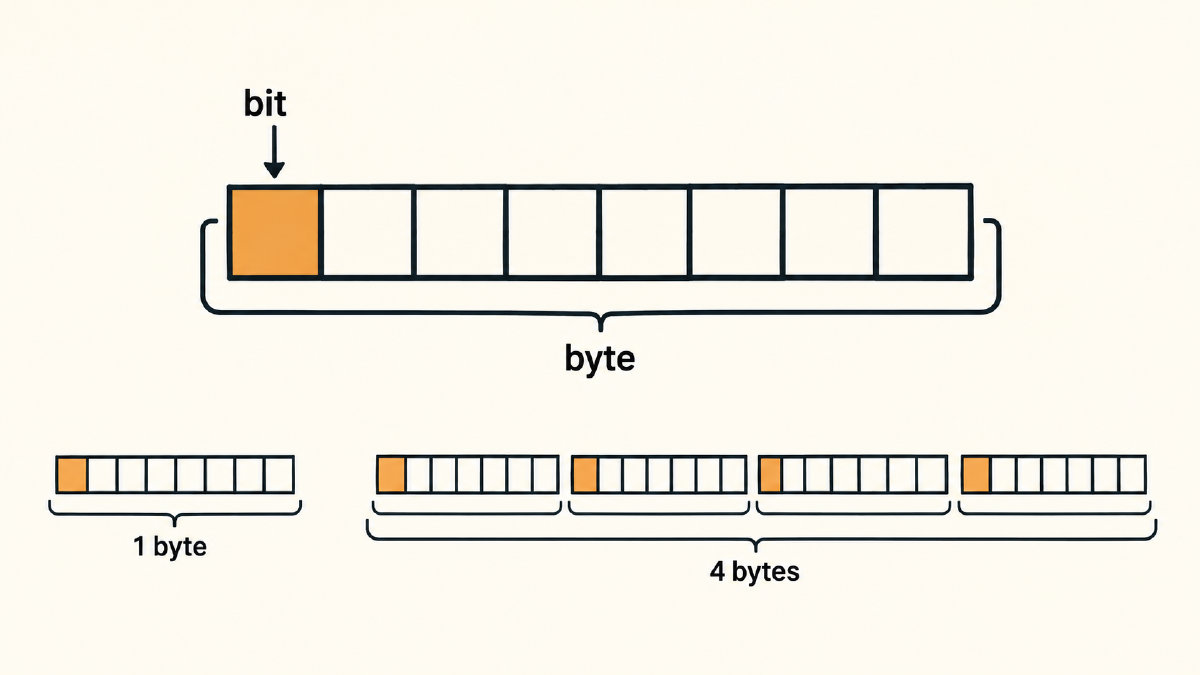
A bit is a binary digit (0 or 1) and is used to represent one unit of information within a larger data structure. A bit is also part of a group of eight bits known as a byte, which serves as a common unit for measuring the amount of data that can be stored within a single addressable location of a computer system.
There are some key points to remember when discussing bits, bytes, and characters:
Bit: a 0 or 1 value
Modern convention: eight bits per byte
Byte: a data-size unit (not necessarily equivalent to a character)
One important thing about the concept of a “bit” is that it doesn’t inherently mean anything on its own. Instead, it’s part of a group of bits that form a particular number. When you double the available patterns with each added bit, you quickly expand the number of possible combinations and values. So, one bit gives you two possible patterns, each additional bit doubles that number, and 2^8 = 256 possible byte patterns.
But here’s where things can become confusing: There’s no direct equivalence between the number of possible byte values (which ranges from 0 through 255) and an alphabet of 256 characters. That’s because ASCII is a seven-bit coding format, which fits inside a wider byte representation using a leading padding bit.
For this article, we’ll walk through how the encoded text works within different examples of how you might count it.
Counting ASCII bytes and bits
Let’s start by walking through an example of counting encoded text, identifying the encoding, and counting the bytes and bits associated with them.
ASCII has a total of 128 values, including control characters and 95 printable characters (counting space). But when you store them as a series of bits, the modern conventional approach uses 8 bits to store them. To avoid ambiguity, the standard ASCII code sets the leftmost bit to zero, meaning there’s only a total of 128 unique ASCII characters instead of the 256 possible patterns of an eight-bit value.
The following is the ASCII character “g”, which is represented as the ASCII code point 103 (decimal). That corresponds to the binary pattern of 01100111. Notice how the first bit (leftmost) is zero, while the remaining seven bits specify the actual value.
UTF-8 and characters requiring multiple bytes
In UTF-8, the first bit tells you whether a character requires more than one byte to represent it. If the first bit is set, then the character may require additional bytes to represent it. For example, the emoji 😊 is represented using four bytes, which contain 32 bits. Each of the following space-separated binary groups represents an 8-bit byte:
😊: 11110000 10011111 10011000 10001010
When you concatenate the two characters together, they require a total of five bytes (40 bits).
Encoded text and visible symbols
You should be careful when interpreting how much storage is required to store your encoded text. The quantity of encoded text (the number of bytes) varies depending upon which encoding scheme you use. However, it also depends on the number of visible symbols you want to display. Unicode allows for any number of Unicode code points, but in practice, many of them aren’t visible to the user.
UTF-8 maps each Unicode scalar value (a code point other than a surrogate) to a sequence of one to four bytes. However, you shouldn’t assume that every visible symbol will require four bytes to represent; rather, each visible symbol can require a certain number of bytes based on the particular symbol.
Bits and bytes in transfer rates
To help you interpret the quantities, I’ve included the most commonly seen examples below. You should remember that these numbers describe the encoded text stored on disk or memory, and not the entire file size.
Lowercase b: commonly bits
Uppercase B: bytes
bps or b/s: bits per second
Bps or B/s: bytes per second
Mbps: megabits per second
MB: quantity of megabytes
Because of the way transfer rates work, you need to make sure you match both time units as well as either bits or bytes to properly compare them.
For example, if a download speed is listed as 10 Mbps, that means 10 million bits per second. On the other hand, if your download speed is 5 MB per second, that equates to roughly 40 Mbps. (Five megabytes multiplied by eight bits yields 40 megabits.) Because you’re measuring them against different units of measure, you cannot directly compare them to see which is faster.
Storage capacity prefixes
Finally, just to help you understand the prefixes associated with storage capacity:
Kilobyte: kB = 1,000 bytes
Kibibyte: KiB = 1,024 bytes
Sources
Try it yourself
Free, in your browser. Nothing you type is uploaded.
More in Binary Basics
- What Is a Binary File? How It Differs from a Text FileWhat is a binary file? Learn how it differs from a text file, compare actual bytes, and understand why translating them may not reveal readable text.
- What Is the Binary System? How 0s and 1s Store Text in a ComputerThe binary system is base-2, using only 0 and 1. See how bits, bytes and place values work and how computers store letters as binary with ASCII and UTF-8.