What Does Square ASCII Code Mean for ■, □ and ²?
Find what square ASCII code means: distinguish ■, □, ² and brackets, understand legacy code 254, and see the documented UTF-8 bytes for ².
- Unicode
- Character Encodings
- UTF-8
On this page
When you search the internet for a specific term like “square ASCII code,” there are several different things you might be referring to. For instance, if you search the term “■ ASCII” or “□ ASCII”, you’re probably going to get a page that tells you the Unicode character for those symbols is U+25A0 and U+25A1 respectively.
However, when it comes to what we’ll discuss here, “■ ASCII” isn’t really a thing. The ASCII table only contains characters that are part of the standard ASCII set (ASCII US-ASCII), which includes 0–127 characters. ■ and □ don’t appear in that range of values, instead appearing in Unicode as BLACK SQUARE and WHITE SQUARE, respectively.
Similarly, the term “² ASCII” will likely bring up another Unicode entry: superscript two, which appears in some legacy character sets but not in standard ASCII. However, the answer that follows will explain how you can map the symbol to a byte sequence through legacy character sets, and then encode that to a UTF-8 sequence. We’ll also resolve other potential meanings of square brackets, too.
Let’s start with identifying characters
The first step in choosing any code point is identification: what do you want to represent? That’s true whether you are dealing with text on the web, or an application such as Microsoft Word.
That means that, if you have a question about “■ ASCII”, you must ask yourself, what exactly do you want to know? There’s the possibility that your question may be misphrased — but that doesn’t stop us from answering!
There are a number of symbols that look like squares, and each is used in a slightly different context:
■ is the symbol for a filled square, often used in diagrams or as a placeholder for text.
□ is the symbol for a white square, often used in similar contexts to ■.
² is the superscript symbol used to indicate exponents in math expressions, typically representing “squared.”
Each has its own use case and its own encoding, and you’ll need to understand how they differ to ensure you are using the right character for the job.
You’ll find these characters in the Unicode Standard (ISO/IEC 10646), which defines characters used in modern computing systems, including computers, mobile devices, etc. They are not present in the original ASCII table, which was defined in 1963 and extended later. Instead, the black square (U+25A0) and white square (U+25A1) were added in Unicode 1.0 (1991), while the superscript two (U+00B2) appeared in Unicode 1.0 as well. You’ll also see superscript two included in some ISO 8859 character sets, such as ISO-8859-1, where it takes the decimal value 178. The black and white squares aren’t included in ISO 8859.
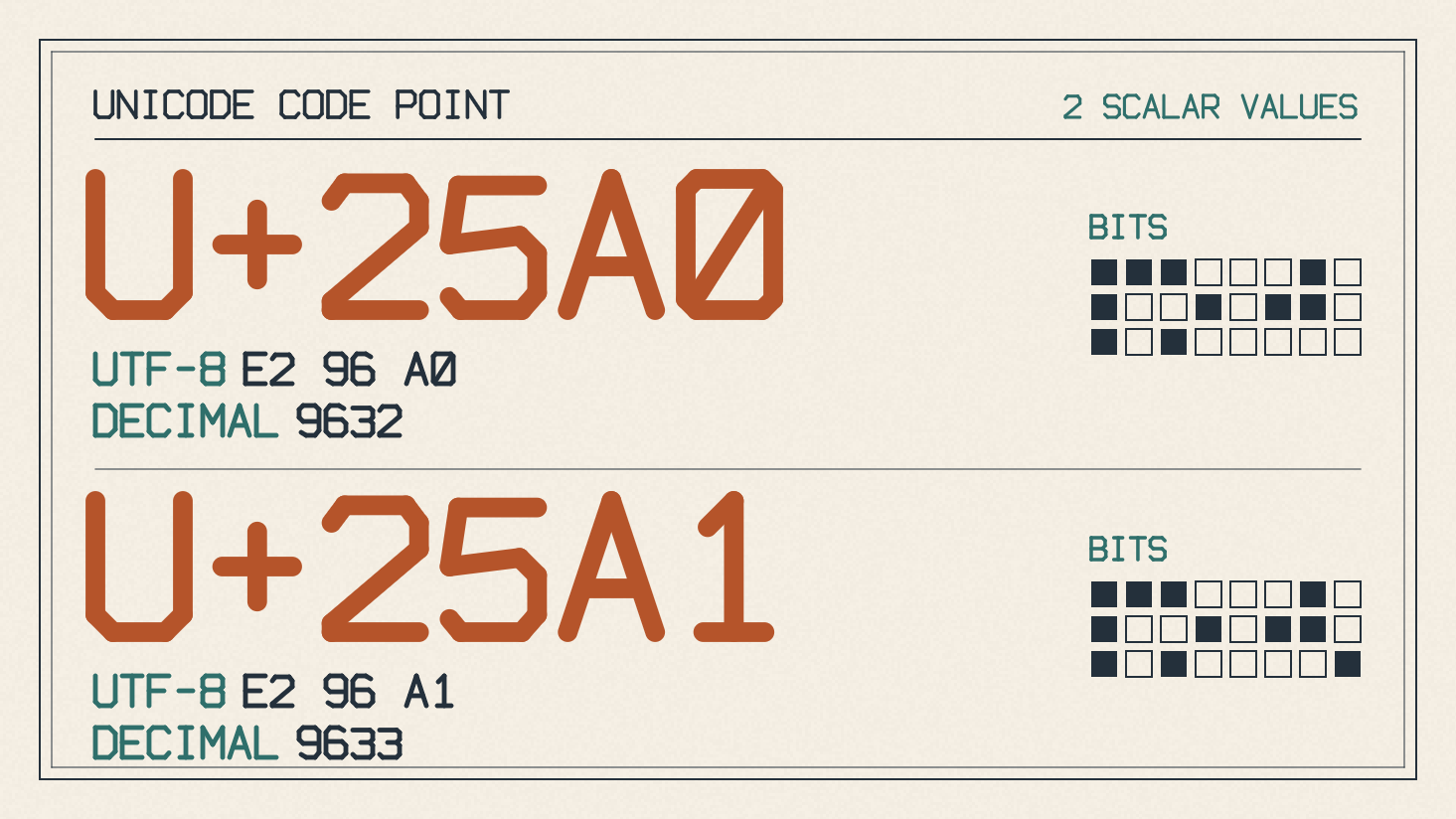
Legacy black-square listing
It is possible, however, that when you’re searching for “■ ASCII” you might encounter the value 254, which represents the black square (U+25A0). This is known as a legacy mapping, meaning that the actual value used depends on the character set or encoding you are using.
For example, within some older terminal applications, you might see this mapped to the value 254, which is outside the range of standard ASCII characters (which spans 0 to 127). It is important to understand that this value is specific to a particular character set or encoding rather than a universal ASCII value. In this case, the black square is simply a legacy way of representing the character within a certain character set. This should help clarify why the value of 254 does not represent the black square in a more traditional ASCII table sense.
Square versus squared
As we’ve discussed, the square itself, represented by ■ or □, isn’t found in the ASCII character table, nor does it exist in most legacy character tables either. These characters are generally stored as Unicode code points in a system such as Windows, macOS, or Linux. The superscript two, however, is quite different.
The superscript two (²) is one of the few symbols used to indicate exponents in mathematics. Its Unicode code point is U+00B2. Within many legacy character sets, it is also known as the superscript two character and is represented by the decimal value 178, which corresponds to hexadecimal B2. In a legacy character table such as Code page 437, this is represented by the decimal value 253, which corresponds to hex FD.
Again, though, this doesn’t necessarily matter if you’re just storing or displaying a character. What matters is how the system you are working in stores it, which could be in a variety of forms. The key difference is that, while the Unicode code point remains constant, the way you store and display it depends upon the encoding.
The superscript two, for instance, is encoded as two bytes in UTF-8: C2 and B2. If you’re converting it to binary, then those bytes translate to the following sequences:
C2 = 11000010
B2 = 10110010
So the superscript two is represented as 11000010 10110010.
The legacy mappings, meanwhile, use different byte values for the same character. In the Code page 437, for example, the superscript two character is stored as the single byte FD, or 253 in decimal. So while UTF-8 uses two bytes, C2 and B2, both encodings represent the same character.
Square brackets
One final thing that could be confusing about the phrase “square ASCII code” is the use of square brackets, such as [ or ].
These are the opening and closing square brackets, which represent a wide range of uses, including separating items in a list. As a side note, you’ll also notice that [ and ] aren’t actually considered “brackets” in the Unicode standard, but are instead known as the “left bracket” and “right bracket.” But again, that’s a minor quibble.
These characters fall into the standard ASCII set, which includes the range of values from 0 to 127, so they’re encoded with the ASCII values of 91 and 93, respectively.
Sources
Try it yourself
Free, in your browser. Nothing you type is uploaded.
More in ASCII & Text Encoding
- How to Find the LSB Bit in an ASCII ByteFind the LSB bit in an ASCII byte, see how changing it turns A into @, and distinguish bit significance from numbering and byte order.
- Bits and Bytes Explained Through ASCII and UTF-8 TextUnderstand bits and bytes with ASCII and UTF-8 examples: eight bits per byte, 256 patterns, and why letters and emoji use different byte counts.
- What Is the Binary System? How 0s and 1s Store Text in a ComputerThe binary system is base-2, using only 0 and 1. See how bits, bytes and place values work and how computers store letters as binary with ASCII and UTF-8.