How BCD Code Stores Digits Differently from ASCII and Binary
Learn how BCD code stores each decimal digit, read four-bit groups, and distinguish packed and unpacked BCD from ASCII text and binary integers.
- Binary-Coded Decimal
- ASCII
- Text Encoding
On this page
A decimal digit is a single number between 0 through 9. Its encoding has a fixed width (the number of bits allocated to the digit) and uses binary digits to encode each digit. In this article, I’ll explain how a different encoding stores these digits as a set of four bits, called Binary-Coded Decimal, or BCD.
One important property of an unsigned digit field is that all digits in it are known to be valid, within the range of 0 through 9. A given four-bit group represents a decimal digit, which means that you can know what it is. If there’s a zero digit, then it’s represented with a four-bit pattern of zeroes. Invalid patterns would not appear in a proper field. But they do exist: there are six more possibilities for a four-bit group that aren’t part of ordinary 8421 BCD.
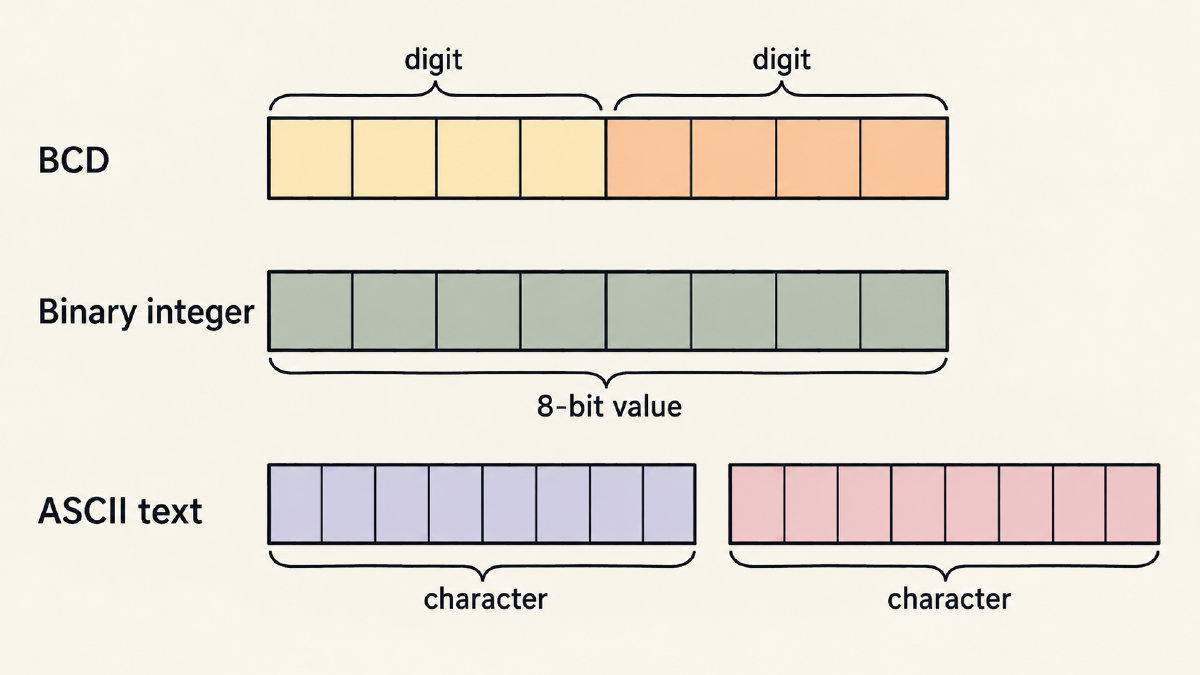
The term “packed” refers to the fact that two decimal digits occupy one byte (a series of eight bits), while “unpacked” refers to the situation where a decimal digit occupies one byte, either with upper bits filled with zeroes or some other convention. When interpreting bytes containing decimal digits, their meaning depends on their context — but when we convert them into text, that changes everything!
BCD Code
Each digit is stored as a separate four-bit group. The mapping used by the most common implementation of 8421 BCD assigns the weight of each bit to a specific position:
Position
Weight
Digit
Decimal
Value
Four-bit
Pattern
0
8
8
1000
1
4
4
0100
2
2
2
0010
3
1
1
0001
These are called weighted values because each bit contributes its own weight toward the overall value of the digit. The four-bit group for each digit must always be read individually, otherwise, it doesn’t work.
Because each group contains four bits, the total number of possible patterns is 16, or 2⁴. Only ten of these patterns are used to represent digits, so there are six invalid four-bit patterns.
Some signed packed formats use a four-bit sign nibble within the packed field to specify whether the number is positive or negative. These might take a variety of forms, including the hexadecimal representation where C stands for positive and D stands for negative.
Field role and specified format determine whether any particular four-bit pattern is valid in any particular position. For example, a certain four-bit pattern may be invalid in a numeric field that requires all digits to be within the range 0 through 9. On the other hand, that same pattern may be acceptable elsewhere.
In both packed and unpacked storage, each digit appears within its own four-bit nibble. Packed BCD simply stores multiple digits together in a field, whereas unpacked BCD allows each digit to be stored separately.
Packed vs. Unpacked
The following table compares basic unsigned packed BCD and basic unsigned unpacked BCD.
Basic unsigned packed BCD
Basic unsigned unpacked BCD
Two decimal digits per byte
One decimal digit per byte
One digit in each four-bit nibble
Digit in the lower four bits
93 → 9 → 1001; 3 → 0011; packed → 10010011
93 → 9 → 1001; 3 → 0011; unpacked → 00001001 00000011
You can think of the unpacked version as padding out each digit with upper bits that define the data type. This is also done in other contexts — such as a signed integer being represented with two’s complement notation and having an upper bit indicating the sign of the value.
Separate Decimal Digits, Integers, and Characters
This is similar to storing two numbers inside one register, but with a twist: the interpretation of the individual bytes matters! Consider the value 57, which is stored in the unsigned packed 8421 BCD format as 0101 0111, which is interpreted as two decimal digits (five and seven).
As a binary integer, the same byte, 01010111, has a value of 64 + 16 + 4 + 2 + 1 = 87, but read as packed BCD digits, it represents 57. As an eight-bit value, it’s 00111001, which is still 57, but now it’s considered a binary number. However, if you consider it as ASCII characters, 57 maps to the ASCII code for the character ‘9’, and 55 maps to ‘7’. That is, 00111001 maps to ASCII character 9, which is the decimal character code for ‘9’. For the whole value 57, binary gives 32 + 16 + 8 + 1 = 57, or 111001 (00111001 in eight bits). ASCII text ‘57’ instead uses two character bytes: 00110101 for ‘5’ and 00110111 for ‘7’.
Text Translation
In my site, I translate between binary and text using the Binary Translator. In doing so, I translate binary to text and vice versa, based on what is appropriate for the input. Text that consists only of decimal digits will be translated as character bytes; for example, ‘7’ becomes 00110111, its ASCII character code in binary.
If I want to map digits to text, I must first interpret the field as digits (either packed BCD or zero-filled unpacked BCD), and then perform the translation. I then need to map each decoded digit to its character code; grouping BCD bits into bytes alone doesn’t convert them to text.
I can see how ASCII digits are related to zoned decimal. Both representations share the same lower digit bits. In addition, ASCII digits are already encoded as text, and the lower nibble matches the corresponding 8421 digit. So the upper nibble for ASCII digits is always 0011.
Sources
Try it yourself
Free, in your browser. Nothing you type is uploaded.
More in Binary Basics
- Why Do Computers Use the Binary System? Two States ExplainedWhy do computers use the binary system? Learn how two signal states simplify logic, tolerate noise and represent letters as bytes.
- Counting in Binary System: How to Count Using 0 and 1Learn counting in binary system notation from 0 to 16, follow carries such as 11 → 100, and understand leading zeros and eight-bit limits.
- How to Find the LSB Bit in an ASCII ByteFind the LSB bit in an ASCII byte, see how changing it turns A into @, and distinguish bit significance from numbering and byte order.