Counting in Binary System: How to Count Using 0 and 1
Learn counting in binary system notation from 0 to 16, follow carries such as 11 → 100, and understand leading zeros and eight-bit limits.
- Binary Counting
- Bits and Bytes
On this page
The binary counting system is a way of representing numbers using just two digits: 0 and 1. This system is used in computers and other electronic devices because it's easy to represent with switches that can be either on (1) or off (0). In this article, I'll explain how the binary counting system works, how to count in binary, and how to add numbers in binary.
Binary Counting System
In the binary counting system, each digit represents a power of two. The rightmost digit is 2^0, which is 1, then 2^1, which is 2, and so on. So, the first few numbers in the binary counting system are:
1 = 1
2 = 10
3 = 11
4 = 100
5 = 101
6 = 110
7 = 111
8 = 1000
9 = 1001
10 = 1010
11 = 1011
12 = 1100
13 = 1101
14 = 1110
15 = 1111
To count in binary, we simply add one from the right, changing trailing 1s to 0s and carrying left until we can change a 0 to 1. We add a new leading 1 only if the carry goes past the leftmost bit. For example, to represent the number 2, we need two bits: 1 and 0. We place the 1 to the left of the 0, resulting in 10. To represent the number 3, we need two bits: 1 and 1. We place them side by side, resulting in 11.
Adding Numbers in Binary
To add numbers in binary, we simply add the corresponding bits together, remembering to carry over any extra ones to the next column. For example, to add 1 and 1 in binary, we get 10. To add 2 and 3 in binary, we add 10 and 11 and get 101.
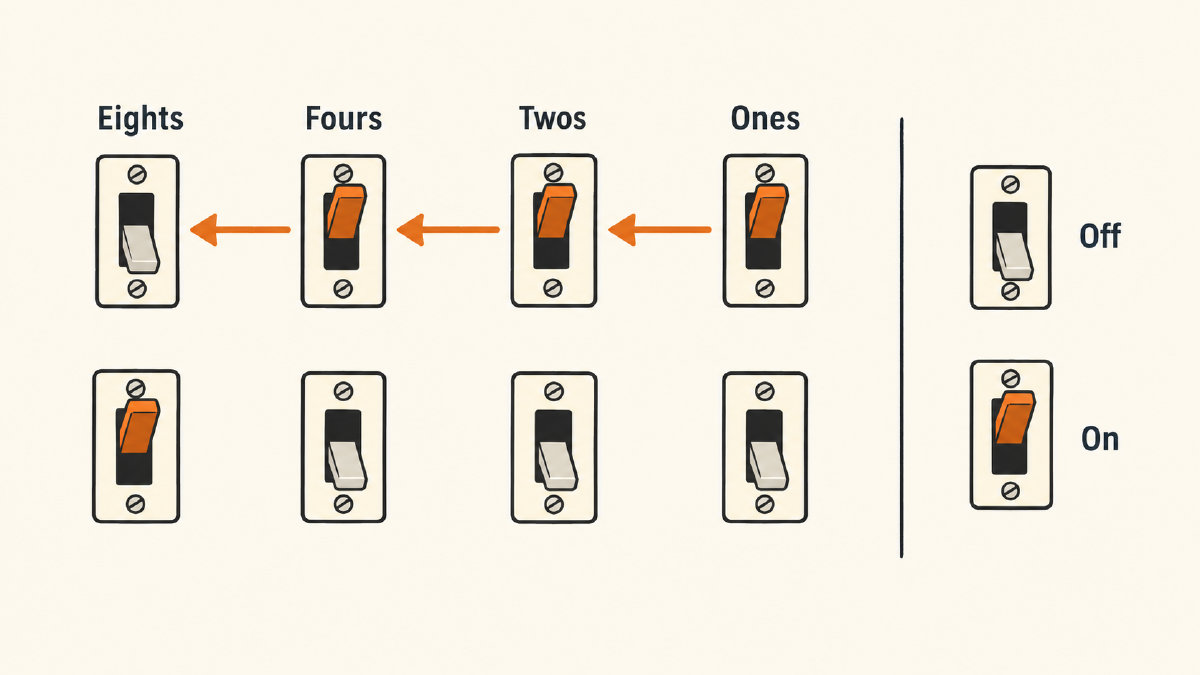
Binary counting is a powerful system because it allows us to represent large numbers using only two digits. It's also very efficient, as each digit only requires one bit of storage.
If you want to learn more about binary counting, there are many resources available online. You can find tutorials, articles, and videos that will help you understand the basics of binary counting and how it's used in computing.
Counting non-negative whole numbers in binary
You can count all non-negative integers, but when you write down your number, you use 0 and 1. Place values double toward the left. For instance, right to left, place values are ones, twos, fours, eights, sixteen, thirty-two, sixty-four, etc. So for the purposes of counting, you’ll have these place values:
Place values in decimal
Right-to-left
Decimal
Positional name
1
One
2
Two
4
Four
8
Eight
16
Sixteen
32
Thirty-two
64
Sixty-four
128
One hundred twenty-eight
256
Two hundred fifty-six
512
Five hundred twelve
1,024
One thousand twenty-four
2,048
Two thousand forty-eight
4,096
Four thousand ninety-six
So, let’s walk through the sequence:
Decimal 0 → binary 0
Decimal 1 → binary 1
Decimal 2 → binary 10
Decimal 3 → binary 11
Decimal 4 → binary 100
Decimal 5 → binary 101
Decimal 6 → binary 110
Decimal 7 → binary 111
Decimal 8 → binary 1000
Decimal 9 → binary 1001
Decimal 10 → binary 1010
Decimal 11 → binary 1011
Decimal 12 → binary 1100
Decimal 13 → binary 1101
Decimal 14 → binary 1110
Decimal 15 → binary 1111
Decimal 16 → binary 10000
Adding one to a binary number
The key to adding one to a binary number is to work from the right, where you can change a zero to one, or reset a one to zero and carry left until you find a zero that you can change to a one. If every bit is one, you must extend the numeral by placing a leading one at the front and zeros at the end. That said, here’s what happens when you add one:
Example 1
Original: 1
Add one: 0
Now move left until you find a zero, changing that to one.
Example 2
Original: 0101
Add one: 0100
Now move left until you find a zero, changing that to one.
Example 3
Original: 0101
Add one: 0110
Final result: 0110
Example 4
Original: 1011
Add one: 1100
Final result: 1100
Aligned practice examples
I’ve aligned the following examples. Leading zeros preserve the value of the number.
Decimal 1: 1
= 0001
Decimal 2: 2
= 0010
Decimal 3: 3
= 0011
Decimal 4: 4
= 0100
Decimal 5: 5
= 0101
Decimal 6: 6
= 0110
Decimal 7: 7
= 0111
Decimal 8: 8
= 1000
Decimal 9: 9
= 1001
Decimal 10: 10
= 1010
Decimal 11: 11
= 1011
Decimal 12: 12
= 1100
Decimal 13: 13
= 1101
Decimal 14: 14
= 1110
Decimal 15: 15
= 1111
Decimal 16: 16
= 10000
Decimal 5: 5
= 00000101
Here’s how the four-bit and eight-bit versions appear.
Four bits: 0101
Eight bits: 00000101
Try this out yourself! What does 0101 become? 0110!
What does 0101 become?
0110
Why doesn’t 11 become 101? Because when every bit is one, you add an additional leading bit to the front, then set all the other bits to zero. In other words, 11 becomes 100, rather than 101. Similarly, 111 becomes 1000.
Unrestricted vs. unsigned counters
You might have noticed that when I showed you binary numerals above, they could vary in length, depending upon the number itself. However, in some applications, you’ll only have room for a certain number of bits, typically 8. A counter that retains exactly eight bits will wrap around once it exceeds its limit.
Let me show you what this means. An 8-bit unsigned counter has a range of values from 0 to 255. There are 256 patterns that you can represent in an 8-bit pattern, from 00000000 (which is zero) to 11111111 (which is 255). Now suppose you want to add one to 11111111; what do you get?
In the unrestricted version, you’d get 100000000. However, if your counter has only eight bits, you discard the extra leading bit. That’s called wraparound.
The full next value is nine bits long, however. Since the counter has only eight bits, the next value would be 00000000.
That’s how you distinguish between an “unrestricted” counter, which is not limited in the number of bits it uses, and a fixed-width “unsigned” counter, which uses a set number of bits to represent non-negative values—eight bits in this example. When the unsigned counter exceeds its maximum value, it wraps around to zero.
Binary vs. text encoding
You should now have a good understanding of how binary counting works. But there’s something you should know: the site’s text-to-binary tool serves to encode text into binary representations, rather than to generate a counting sequence.
For example, if I input the binary numeral “1”, you should expect the numeric value “one,” since the binary numeral 1 is the same as the numeric one. However, the ASCII character “1” resides in column 3, row 1 of RFC 20, which defines the ASCII standard.
In this case, the ASCII character “1” is represented as seven-bit code 0110001. If we use an eight-bit code, we need to include a high-order bit. Since the high-order bit must be zero for ASCII, we can represent it as 00110001.
Our site’s text-to-binary tool encodes text into binary, using the appropriate number of bits for each character, usually either 7 or 8. Characters such as spaces, commas, or even nothing separate the individual characters in the final output.
Sources
Try it yourself
Free, in your browser. Nothing you type is uploaded.
More in Binary Basics
- How to Find the LSB Bit in an ASCII ByteFind the LSB bit in an ASCII byte, see how changing it turns A into @, and distinguish bit significance from numbering and byte order.
- Bits and Bytes Explained Through ASCII and UTF-8 TextUnderstand bits and bytes with ASCII and UTF-8 examples: eight bits per byte, 256 patterns, and why letters and emoji use different byte counts.
- What Is a Binary File? How It Differs from a Text FileWhat is a binary file? Learn how it differs from a text file, compare actual bytes, and understand why translating them may not reveal readable text.