Why Do Computers Use the Binary System? Two States Explained
Why do computers use the binary system? Learn how two signal states simplify logic, tolerate noise and represent letters as bytes.
- Digital Logic
- Bits and Bytes
On this page
Computers and electronics make use of the binary system, but what is it that makes it work so well?
The key lies in the concept of two states. These can be represented as “on” or “off”, 0 or 1, or high and low voltage levels, for instance.
This isn’t an accident — there are engineering reasons why this is the best choice to make electronic circuits operate reliably. The distinction between the two signal levels is also what enables these circuits to represent more information.
How reliable are we?
One way to look at it is that representing data in a simple binary format makes the process of recognizing and dealing with disturbances much easier. In other words, if you have only two distinct states, you can simply look for which one they are closest to and accept that the data will be interpreted correctly.
But here’s where things get interesting: how do you actually distinguish between the two states? You need some sort of margin. In other words, your signal has to vary significantly enough from its neighbors so that any disturbance doesn’t cause the signal to be misinterpreted. That might sound like you’re being picky, but that’s how it works.
Let’s take two different examples. Imagine that you’re trying to send the number ten, using ten different levels. But you don’t want to worry about what happens if someone messes with your signal on the wire; all you want is to ensure that it gets sent accurately. However, if you instead choose to send only two levels (say, 0 and 1), then there’s a chance that the signal will be misread — and that’s just part of the engineering trade-offs involved.
In the case of a single bit, though, errors still occur. So engineers add in margins to account for those possible errors.
Logical values
What does that mean for logic circuits, specifically? Well, the actual logical values (i.e., whether something is true or not) are defined by their electrical signals. That is, a value of zero (or one) is assigned based on what level of electricity flows through the circuit. But the exact level used depends on the circuit.
Circuits define their own input requirements, but also specify output specifications.
So, for example, a particular digital circuit will expect a certain range of voltages on its inputs — and this defines the logical inputs. On the outputs, it’ll specify what voltage levels are produced given the same logical input conditions. But, critically, if you have compatible output and input logic levels, then the circuit can be interfaced with other circuits without worrying about interference.
You can imagine this in terms of “compatible” input and output logic levels. That’s what allows us to connect components together, even though they may differ slightly from one another.
Switching
Electrically controlled switching was the first step in building computation into a circuit. After all, a transistor is essentially a tiny electronic switch, controlled by electricity. If you have groups of transistors, they can form logic gates, such as NAND, XOR, and AND gates. These gates are used to perform basic operations, and multiple gates can be combined to create complex operations. This allows for processing instructions within a program.
Letters of the alphabet
Now consider the following problem: how does an entire letter, say “A,” get represented within an eight-bit sequence? One byte contains eight bits. Those eight positions carry a binary value, either 0 or 1. How many possibilities exist for the values in each position?
If you think of them as individual digits, each can take one of two values. Eight of them would provide 256 combinations. In ASCII, the letter “A” is encoded as 01000001. That’s a representation that uses 8 bits, and that’s how the character is transmitted or stored.
Of course, that 8-bit sequence has no meaning until encoding assigns it a specific character. Then, the pattern of ones and zeros becomes meaningful. It’s the combination of all the bits that gives a letter meaning, not the individual bits themselves.
More than two states
Flash-memory cells can store a variety of data, and they’re usually designed to have several physical states that encode binary information. For example, a single-level cell (SLC) NAND flash memory typically stores a single bit per cell, with two physical states. Multi-level cell (MLC) NAND flash uses four physical states to store two bits per cell, allowing for higher storage density. A more modern flash memory technology, three-dimensional (3D) NAND, increases storage density even further by stacking memory cells vertically.
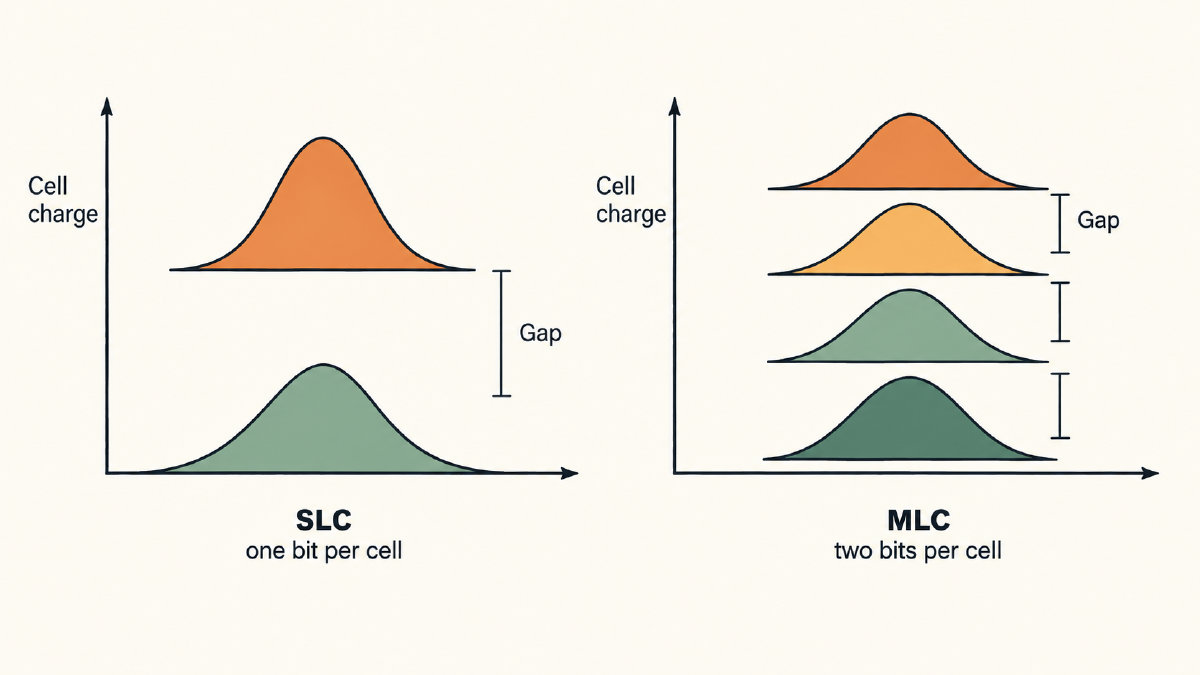
As the number of bits per cell increases, so too does the number of physical states that represent that information. However, increasing the number of bits per cell trades away some separation between the physical states, potentially increasing the likelihood of an error occurring.
Although the term “binary” describes the information being carried, the actual storage of that data inside the chip can use more than two physical states to represent it.
Sources
Try it yourself
Free, in your browser. Nothing you type is uploaded.
More in Binary Basics
- Counting in Binary System: How to Count Using 0 and 1Learn counting in binary system notation from 0 to 16, follow carries such as 11 → 100, and understand leading zeros and eight-bit limits.
- How to Find the LSB Bit in an ASCII ByteFind the LSB bit in an ASCII byte, see how changing it turns A into @, and distinguish bit significance from numbering and byte order.
- Bits and Bytes Explained Through ASCII and UTF-8 TextUnderstand bits and bytes with ASCII and UTF-8 examples: eight bits per byte, 256 patterns, and why letters and emoji use different byte counts.