What Is Binary Code Used For? Text, Images, Audio and Programs
Learn what binary code is used for in text, images, audio and programs, with an ASCII example and an explanation of why decoding depends on format.
- Text Encoding
- File Formats
- Bits and Bytes
On this page
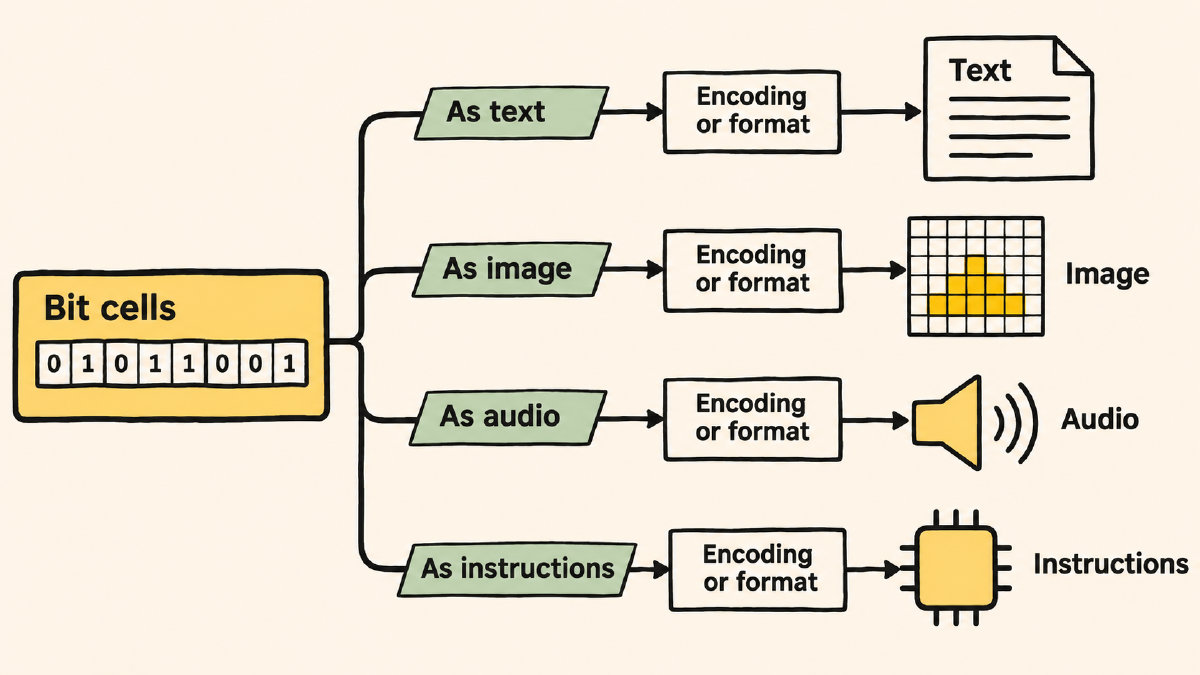
We use binary all the time. Bits are used to store and communicate information in many forms: text, images, audio and video, programs. All of these things share a representation of 1s and 0s; but each uses their own rules about how those bits mean something.
Text and Character Encoding
Text messages are stored as sequences of bytes, which are combinations of 1s and 0s that represent characters. The ASCII table represents the values for each letter. If you remember the ASCII table, you'll recall that A = 65. You can represent that value as 8 bits, so A = 01000001 (the leading zero is there because the ASCII table only contains seven-bit values). Unicode builds upon ASCII, expanding to other languages, symbols, etc. UTF-8 uses variable widths — one to four bytes per Unicode code point. ASCII values remain single-byte within UTF-8.
Images are made up of samples. Each pixel's color data is stored in the image file, with the number of bits per sample determining the amount of detail captured by the image sensor. In a truecolor case, there are three colors represented by an RGB triple: red, green and blue. In PNG Version 1.0, this would be referred to as a “truecolor” configuration. The specific bit depth of the image determines how many bits are stored per sample. This can be eight or sixteen bits per sample, depending on the device capturing the image. Here’s an example using eight bits:
Three samples × 8 bits = 24 bits of color data per pixel
There are then 24 bits of color data per pixel, which equals 24 bits before being filtered and compressed. The image has a bit depth of eight bits per sample (eight bits, or 1 byte) rather than 24 bits per pixel. To illustrate this, here’s what we get for the filter method:
Filter method 0: Filter type byte prepended to each scanline
Filtered data is then compressed into the IDAT datastream.
Other image configurations vary based on the number of bits in a color component. Raw count doesn’t determine how large a PNG will end up being.
Audio Video and Programs
Audio and video files contain streams of binary. These are decoded by media players and transformed into signals that a speaker can play back. When you run a program, your CPU is performing logical and arithmetic operations on the program instructions.
So why do we interpret bits differently? Because they appear the same! What we're seeing in bits alone isn't necessarily what they're meant to be used for. That’s where character encoding comes into play, as well as the structure of a file.
You can see what text conversion can accomplish by visiting the site’s translator. Here’s some binary to try: 01000001, which the translator decodes as UTF-8 text to give us A. However, it’s possible that this might not work. As you’ll see, the site’s translator doesn’t support every typed text to binary combination. However, if you paste in binary, our software will attempt to decode it as UTF-8 text. Image and audio data require different decoders to decode and present the contents of the data to us. Converting text to binary doesn’t keep it secret. Binary encoding alone isn’t encryption, though cryptographic algorithms use binary operations to encrypt and decrypt data.
Prior publication on Jieyi’s blog and permission to republish this article have not been verified.
Sources
Try it yourself
Free, in your browser. Nothing you type is uploaded.
More in Binary Basics
- How to Find the LSB Bit in an ASCII ByteFind the LSB bit in an ASCII byte, see how changing it turns A into @, and distinguish bit significance from numbering and byte order.
- Who Invented Binary Code? Leibniz and the Road to ASCIILearn who invented binary code, what Leibniz contributed to binary arithmetic, and why ASCII text encoding has a separate history.
- Bits and Bytes Explained Through ASCII and UTF-8 TextUnderstand bits and bytes with ASCII and UTF-8 examples: eight bits per byte, 256 patterns, and why letters and emoji use different byte counts.