How to Convert Text into ASCII Codes, with Examples
Convert text into ASCII codes with worked examples for letters, spaces and punctuation, then see how decimal values relate to binary bytes.
- ASCII
- Text Encoding
On this page
Converting text to numeric characters is an easy task. As you'll soon discover, it's also a fun way to explore ASCII and Unicode.
ASCII is a standard set of character codes. While most people are familiar with the decorative aspect of ASCII art, converting text to ASCII involves taking individual characters and assigning each a numeric ASCII value. The result will be a sequence of numbers representing your original message.
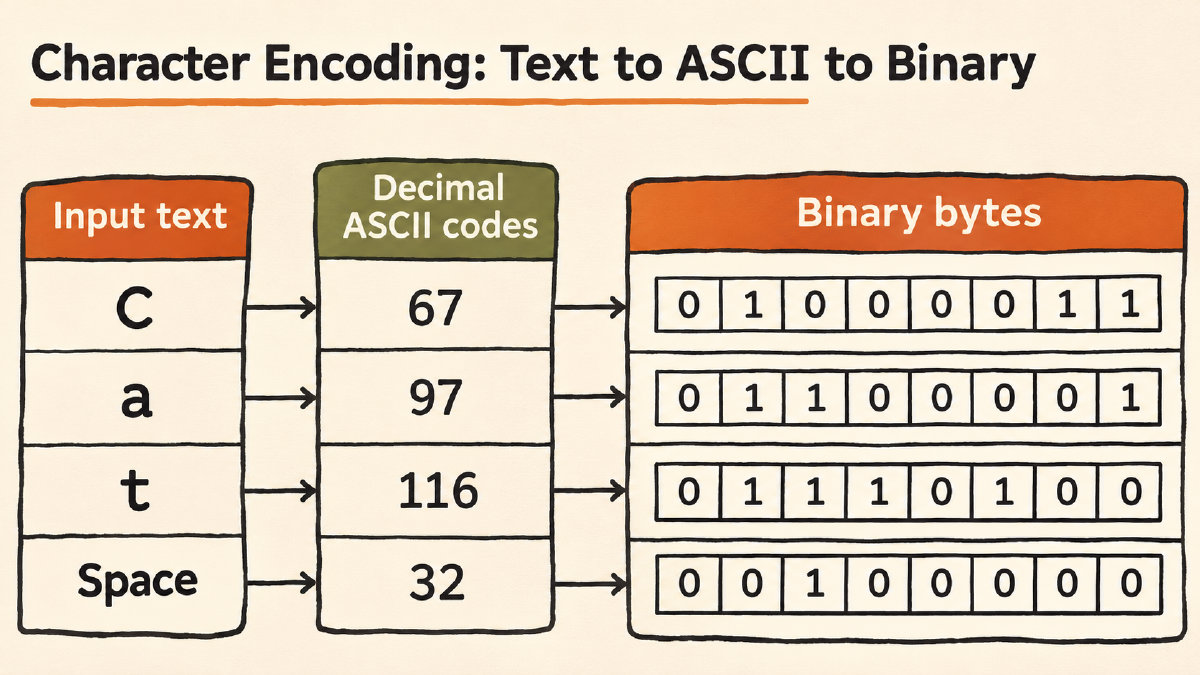
You can use this technique for simple messages or more complex ones. But first, let's see how it works.
How to Convert Text into ASCII
Each ASCII character has a specific numeric value, which is used to represent the letter in a computer system. For example, the letter "H" has the ASCII value 72, while the letter "i" has a value of 105.
When you convert your text into ASCII, you're simply using these numeric values to represent your message. So the word "Hi!" would become: 72 105 33
The conversion is done on a character-by-character basis, and the order of the characters remains unchanged. This means that punctuation marks and spaces will be preserved as well. For example, if we have the phrase "Hi !", the ASCII values would be 72 105 32 33
In addition, capitalization will remain unchanged. Uppercase H is still 72, and lowercase h is still 104. The difference lies only in the fact that their ASCII values are different.
Separators and Binary Representations
What about the separators? Well, they’re just presentation delimiters. That’s all. In binary, our "Hi!" example becomes: 01001000 01101001 00100001. Decimal and binary represent the same values, just written differently. ASCII uses seven bits, so you can add a leading zero to fit each value into an eight-bit byte.
If you’re not comfortable working directly with binary code, take a look at the site’s alphabet reference for a complete list of letters, digits and common symbols along with their decimal and 8-bit (binary) representations.
There’s also a documented tool to convert text to binary, so that you can view how the characters are represented as sequences of bits, too.
As a final thought, keep in mind that tabs and line breaks have numeric values as well. A tab is 9, LF is 10, and CR is 13. So CR followed by LF becomes: 13 10. Depending on the receiving format, a line ending may consist of one character (e.g., LF), or two (CR followed by LF). Line endings are sometimes referred to as new lines, but they’re usually just a matter of sender–recipient agreement. How they’re represented depends on the receiving format’s convention.
Non-ASCII Characters
It might seem strange, but there are some non-ASCII characters, too. In general, the ASCII character range is from 0 through 127, and includes uppercase and lowercase English letters, digits, and a few common symbols like “!”, “@”, “#”, and “$” — all of them.
But other characters, such as accented letters (like ü, ë, etc.) or curly quotes (“ and ”) are not included in the ASCII table. Nor are emoji or other pictographic characters. However, they still have numeric Unicode code points, and you can encode them in UTF-8 without changing them. Converting them to ASCII requires changing the input.
UTF-8 is an encoding method you can use when preserving the input is important. UTF-8 is essentially a superset of ASCII. Instead of assigning characters values between 0 and 127, UTF-8 assigns bytes to characters. In turn, those bytes are assigned to Unicode code points. A Unicode code point in UTF-8 takes 1–4 bytes, depending on the code point itself. All ASCII characters (those whose Unicode code points are less than 128) appear as single-byte sequences in UTF-8, unchanged. Other characters appear as multiple-byte sequences, each byte of which corresponds to part of the Unicode code point.
But even then, there’s a distinction to make between Unicode code points and ASCII codes. You can tell them apart because ASCII code values are less than 255, but you cannot assume that anything with a value below 255 is ASCII.
Sources
Try it yourself
Free, in your browser. Nothing you type is uploaded.
More in ASCII & Text Encoding
- How to Find the LSB Bit in an ASCII ByteFind the LSB bit in an ASCII byte, see how changing it turns A into @, and distinguish bit significance from numbering and byte order.
- What Is the Character Code for Degree Symbol °?The character code for degree symbol ° is U+00B0. See its UTF-8 binary bytes, HTML references and the documented Word shortcut.
- How to Encode and Check a Binary Code TattooEncode a binary code tattoo message, preserve its exact text and byte order, and check the final stencil against your saved binary.