What Is Unicode? Characters and UTF-8 Bytes Explained
Understand Unicode characters, code points and UTF-8 bytes, with binary examples for letters and an explanation of accented characters and emoji.
- Unicode
- UTF-8
On this page
Let’s start with a basic set of ordinary letters, such as the letters A through Z.
Each of these is represented by a Unicode character. These characters all have a unique identity — that is, they’re defined as characters in Unicode, or what we call code points.
In general, you can identify a code point with its hexadecimal value, which appears as something like U+0041, where the 0041 represents the hexadecimal code for the letter “A.” In decimal terms, this would be the number 65, and in binary it’s 01000001.
Unicode’s full range of code points extends from U+0000 to U+10FFFF. The first 128 characters in Unicode are exactly the same as ASCII.
Code Points and UTF-8 Bytes
But there’s another important thing to note: the distinction between a code point’s identity (i.e., its representation) and how that character is stored in a particular encoding format, such as UTF-8.
A single code point may use up to four bytes in storage. But if you combine several code points together, you might create a visible character. This means that one code point isn’t necessarily equal to one byte. And a single visible character may consist of more than one code point, which may take more than four bytes of storage.
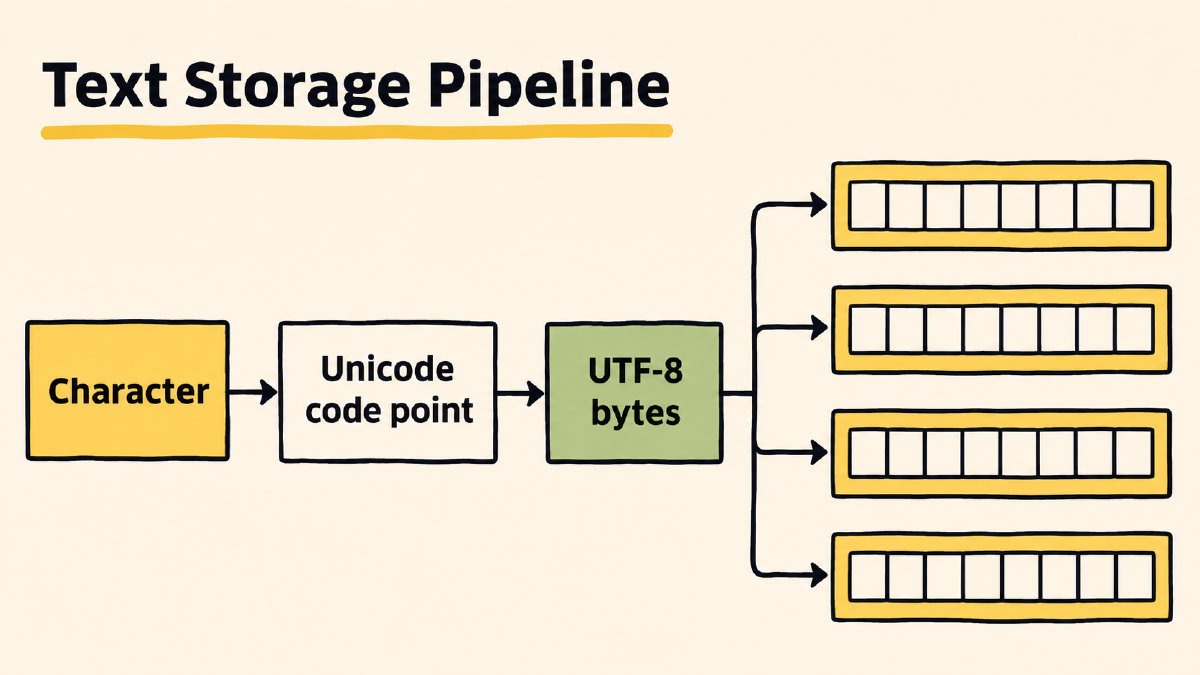
The Unicode standard defines the U+ notation as an identifier for a code point, using hexadecimal digits. However, some encodings, such as UTF, define an algorithmic mapping of code points into a sequence of bytes that uniquely represent them. The exception is for the so-called surrogate code points, which are used in pairs in UTF-16 to encode code points from U+10000 to U+10FFFF; surrogate code points aren’t included here because UTF-8 doesn’t support them.
UTF-8 is a variable-width encoding, meaning that a given code point can take up to four eight-bit bytes. So a code point could be one byte, two bytes, three bytes, or four bytes. For example, the letter “A” uses just one UTF-8 byte, whereas the accented letter “ś” (which you’ll see later on in the examples) uses two.
When you convert each of these code points into a byte value, then into their binary equivalents, you’ll end up with a series of bits grouped in chunks of eight bits. Each group is equivalent to two hexadecimal digits, representing one byte. Only byte values from 0 to 127 correspond to ASCII characters in UTF-8.
Letters and Their UTF-8 Bytes
Let’s look at the first few characters of the Latin alphabet. Here’s the letter “A,” or U+0041, as hexadecimal. That equals 65 in decimal, and 01000001 in binary.
Here’s the letter “ ś” (the Polish letter “s” with an acute accent), which is U+015B, or 347 in decimal, or 101011011 in binary. Because the “s” has an accent, it uses two UTF-8 bytes. One of those is C5 (hexadecimal), which is 11000101 in binary. The second is 9B (hexadecimal), or 10011011 in binary.
Because UTF-8 preserves the ASCII table, the byte values above 127 will be different than those of the Latin-1 character set, which was created by expanding ASCII into an 8-bit system. (That’s why the term “Latin-1” sometimes appears alongside the “Latin-1 Supplement” as a block of code points.) Note that UTF-8 bytes can be written in hexadecimal with spaces between them, as in C5 9B.
Combining Accents and Unicode Normalization
Now let’s explore a simple way of creating characters that contain accents: by combining a letter with an accent. An example is é, which is formed by combining the letter “e” (U+0065) with the combining acute accent (U+0301). As a result, é is represented by two code points: U+0065 followed by U+0301.
This two-code-point sequence is canonically equivalent to the single code point U+00E9. You’ll see NFC and NFD appear when talking about normalization. NFC is the canonical composed form. NFD is the decomposed form.
In the NFC model, “é” is a single code point: U+00E9. But in the NFD model, it’s represented as two code points: the base letter and the accent. NFC and NFD are both valid forms and are considered equivalent in terms of appearance. In either case, you’d get the same “é” that you see on screen.
Normalization refers to handling different equivalent representations within the Unicode framework. In NFC, combining sequences are composed where possible, but some remain multiple code points. In NFD, characters are canonically decomposed, so a letter like “é” becomes the base code point followed by the separate combining accent.
There’s another consideration: Some combinations of code points may not yield the same results depending on the order in which they’re processed. For instance, adding an accent to a letter may differ from adding a letter to an accent. Normalization brings canonically equivalent sequences into the same form, but it doesn’t make arbitrary character orders equivalent.
So, in the example I provided earlier, NFC and NFD yield the same appearance for “Amélie,” but not the same sequence of code points. NFC and NFD are both valid ways to represent characters.
Emoji Code Points and Bytes
Now, how does all of this apply to emoji? Well, emoji are a special category of Unicode characters, representing pictographs and icons. An emoji may be represented by a single code point or a sequence of code points. However, the way you perceive them may not align with the way the Unicode standard represents them.
For example, the dog emoji is represented by a single code point: U+1F436. Since this is a supplementary code point, it’s represented by a sequence of four bytes when encoded in UTF-8.
Some perceived emoji units may consist of combining or other characters. In effect, the actual number of bytes required to store the emoji depends on the constituent code points.
Ultimately, though, the key idea is that Unicode provides the foundation for text encoding across languages and scripts. Whether you’re working with English text, emojis, or anything else, Unicode enables consistent and accurate representation of characters worldwide.
Sources
Try it yourself
Free, in your browser. Nothing you type is uploaded.
More in ASCII & Text Encoding
- How to Find the LSB Bit in an ASCII ByteFind the LSB bit in an ASCII byte, see how changing it turns A into @, and distinguish bit significance from numbering and byte order.
- What Is the Character Code for Degree Symbol °?The character code for degree symbol ° is U+00B0. See its UTF-8 binary bytes, HTML references and the documented Word shortcut.
- How to Encode and Check a Binary Code TattooEncode a binary code tattoo message, preserve its exact text and byte order, and check the final stencil against your saved binary.